
If you use notes in ShalomCloud, there’s a small but useful update worth knowing about: note queries and reminder emails now display the date a note was created.
What’s already available
You can already search notes by fields like:
- Assigned to
- Reminder date
- A word or phrase in the note body
- Open notes or all notes
- Dates related to your note records
If you’re new to this area, it may help to first get familiar with private notes and assigning notes so you understand the basics of how notes work in Shalom Cloud.
What’s new
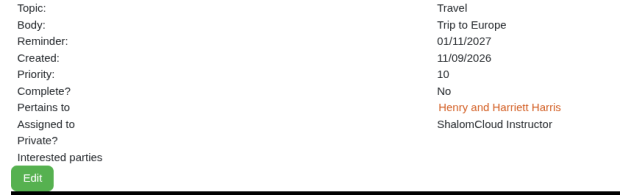
The key enhancement is the addition of the created date.
When you run a note query, you’ll now see:
- The reminder date
- The created date
This also applies when exporting notes, where the created date appears alongside the reminder date.
Why this matters
The created date gives you extra context when reviewing notes, especially if you need to compare when a note was entered versus when it is due. That extra timeline detail can make it easier to track activity and understand the history behind a note.
Reminder emails for due notes
Shalom Cloud can also send scheduled email reminders for notes that are past due or due within the next few days. These emails can be configured for your entire synagogue on a shared schedule.
Common schedule options may include:
- Every day
- Specific weekdays
- A custom time of day
Once configured, users receive reminder emails that list notes due soon or already overdue. Past-due items are highlighted in red, while upcoming items appear with their due dates and note details.
A simple but helpful update
This is not a major overhaul, but it is a practical improvement that adds more visibility to note tracking. If you regularly use notes in Shalom Cloud, the created date in queries, exports, and reminder emails should make the feature even more useful.
If you haven’t explored notes lately, now is a good time to take another look and make the most of the note tools already available to you.
See the full video: https://share.shalomcloud.com/01a1c120-1677-7189-9596-f71cd593ed36?sa=blog_post